 Hide distractions
PageMine
Hide distracting elements on any webpage. Your layout, your rules.
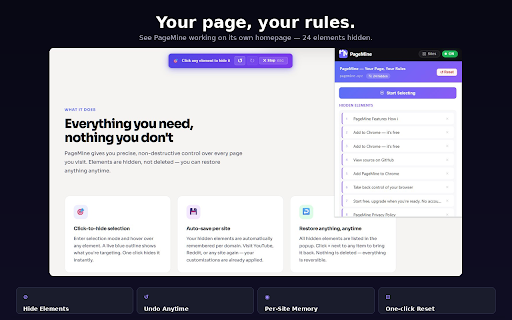
Point at distracting elements and hide them without writing CSS or installing a heavy blocker.
Hidden-element rules are designed to stay in your browser and apply when you revisit the site.
Undo individual hidden items or reset a site when a page layout changes.
Built for one clear browser job.
PageMine lets you hide any element on a website with a single click. It remembers your choices per site, gives you undo and reset controls, and keeps everything private and local.
Best for: Readers, researchers, students, developers, and anyone who wants cleaner web pages without extra clutter.
The problem it solves
Sidebars, banners, popups, recommendation blocks, and sticky widgets make useful pages harder to read and repeat every time you return.
Point and click to hide sidebars, popups, sticky banners, and recommendation blocks
Auto-save hidden elements per website so the page stays clean next time
Undo individual hidden elements from the popup list
Reset a site in one tap and keep all rules stored locally
From install to useful in minutes.
The workflow is intentionally small: install the extension, set up the thing you want to save or control, then use it directly inside Chrome.
Turn on selection mode from the extension popup.
Click the element you want to hide, such as a banner, sidebar, or popup.
Return to the site later and PageMine reapplies the local rule automatically.
How people use PageMine
Start with the core workflow
Install from the Chrome Web Store, try the everyday workflow, and upgrade only when you need heavier use.
- Hide unwanted elements with one click
- Remember cleanup rules for everyday sites
- Undo or reset rules from the extension popup
Unlock PageMine Pro
Built for heavier use, larger libraries, better organization, and easy backup.
- More saved websites and rules
- Rule backup
- Advanced selector editor
- Quick site profiles
Questions before you install.
What is PageMine best at?
Readers, researchers, students, developers, and anyone who wants cleaner web pages without extra clutter.
Does PageMine upload my browsing data?
No. PageMine keeps your extension data in your browser and does not send your snippets, notes, rules, schedules, or tab groups to an Odexly server.
Do I need an account to start?
No. You can install the extension from the Chrome Web Store and use the core workflow without creating an Odexly account.
What can I use for free?
- Hide unwanted elements with one click
- Remember cleanup rules for everyday sites
- Undo or reset rules from the extension popup
What does PageMine Pro add?
- More saved websites and rules
- Rule backup
- Advanced selector editor
- Quick site profiles
Do I need to buy every Odexly product?
No. Each extension has its own Pro path, so you can upgrade only the product that fits your workflow.