


01
Automatic draft saving
Draft Guard can monitor supported text fields and save writing progress based on the timing the user selects, reducing the risk of losing work during browser interruptions.
Never lose important text you were typing online.
Odexly Draft Guard auto-saves text and rich-text drafts you type online, then helps recover them after reloads, crashes, failed submits, closed tabs, accidental navigation, or form resets.
No forced account · Local-first where possible · Chrome Web Store listing status shown clearly
 Chrome extensionOdexly Draft Guard - Auto-save Text Drafts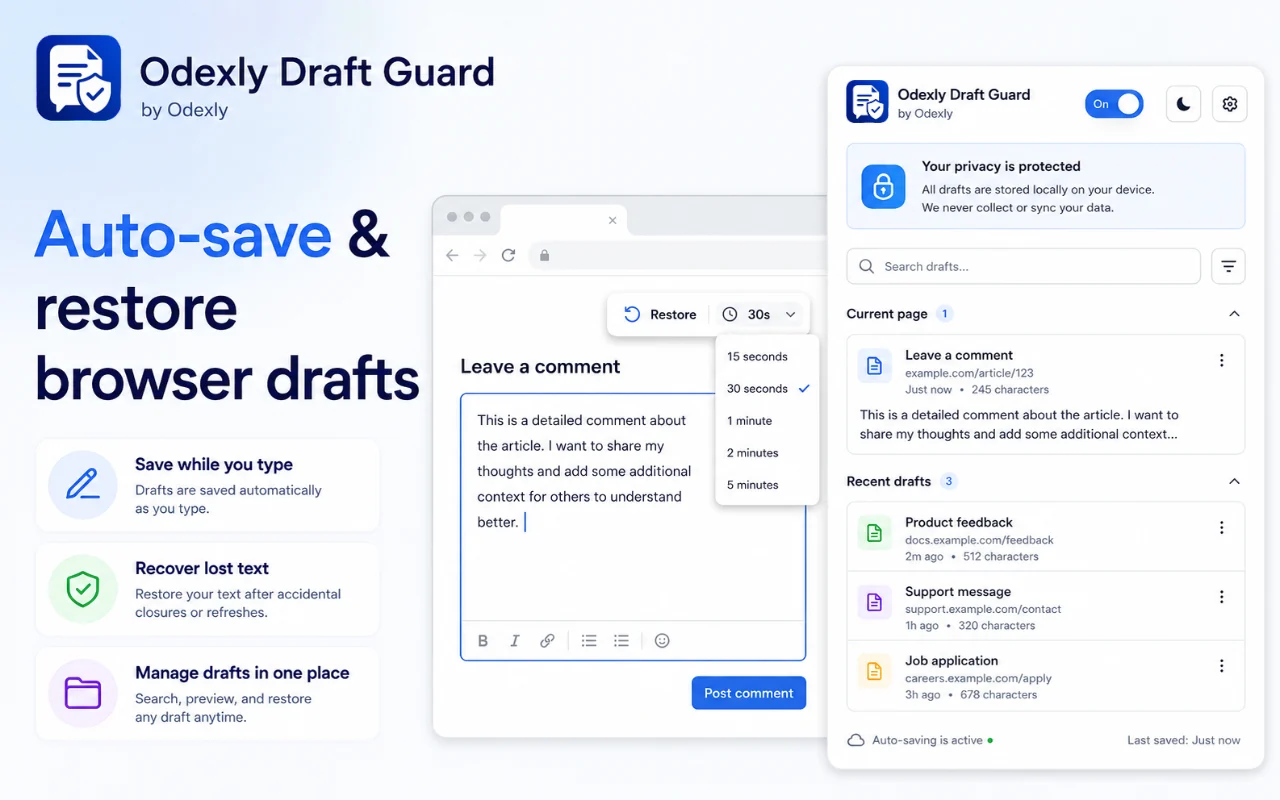
Best for: People writing emails, forms, comments, support replies, CMS content, social posts, notes, and long online messages.
Draft Guard can monitor supported text fields and save writing progress based on the timing the user selects, reducing the risk of losing work during browser interruptions.
A compact toolbar stays near the active writing area so timing options, restore actions, and draft controls are available where writing happens.
Saved versions can be reviewed and restored when needed, making it easier to recover from accidental deletion, page resets, refreshes, or failed form submissions.
Important drafts can be pinned for easier access, useful for reusable replies, important notes, unfinished messages, and content that should stay easy to find.
The management screen organizes saved drafts into practical sections so users can review, restore, pin, or clean up content from one place.
Where the target editor supports it, Draft Guard is designed to preserve formatted writing such as bold, italic, colors, font styles, and other rich text content.
Browse actual extension screens and key flows before installing from the Chrome Web Store.
Odexly Draft Guard: screenshot 1 of 5. Auto-save and restore overview
Answers focus on what is currently stated for this product, without adding unsupported review or download claims.
No. The core workflow is designed to work from the Chrome extension without creating an Odexly account.
Suggested by related category, workflow group, availability, and visual tone.


