


01
Point-and-click hiding
Click the PageMine icon, start selecting, hover to highlight an element, and click to hide it from the page.
Hide distracting elements on any webpage. Your layout, your rules.
PageMine lets you hide page elements with a simple point-and-click workflow, remembers your choices per site, and keeps the experience private, offline, and easy to undo.
No forced account · Local-first where possible · Chrome Web Store listing status shown clearly
 Chrome extensionPageMine — Hide Distractions on Web Pages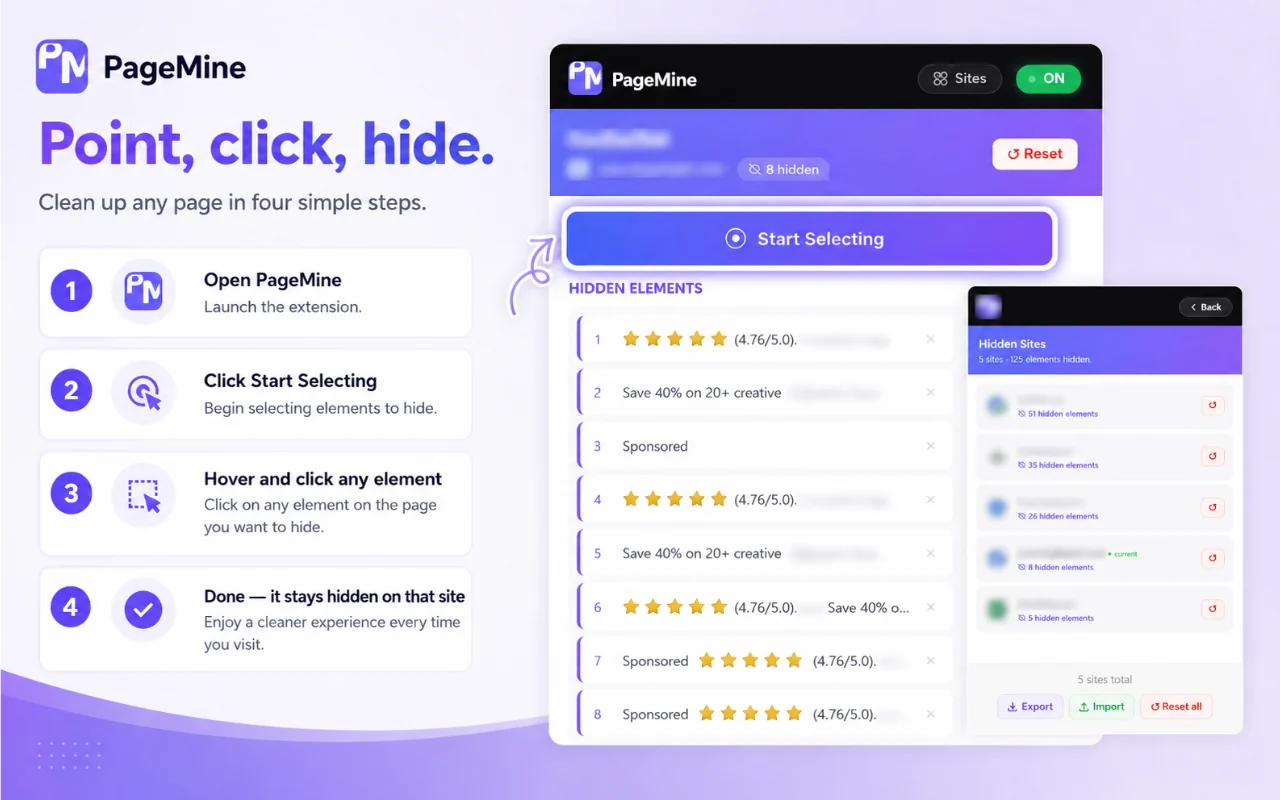
Best for: Readers, researchers, students, shoppers, focused workers, and anyone who wants quieter web pages without writing CSS.
Click the PageMine icon, start selecting, hover to highlight an element, and click to hide it from the page.
Hidden-element choices are remembered per site so you do not need to repeat the same cleanup every visit.
Changed your mind? Open the popup list and restore hidden elements without rebuilding the page manually.
Reset a site to its original layout when a page changes or you want to start fresh.
Use it to hide sidebars, suggested content, comments, popups, related products, unused widgets, and other page distractions where extensions are allowed.
PageMine is designed to store rules locally, without tracking, servers, or accounts.
Browse actual extension screens and key flows before installing from the Chrome Web Store.
PageMine: screenshot 1 of 5. Start selecting elements
There is no paid plan advertised for this utility. The current product is presented as a free tool.
How Odexly approaches ProAnswers focus on what is currently stated for this product, without adding unsupported review or download claims.
No. The core workflow is designed to work from the Chrome extension without creating an Odexly account.
Suggested by related category, workflow group, availability, and visual tone.


