


01
Reusable text library
Save customer replies, email templates, greetings, support messages, personal notes, task updates, and common writing blocks in one clean place.
Save reusable text and insert it instantly with shortcuts.
Odexly Snippets helps you save repeated replies, templates, notes, signatures, support answers, and form responses, then insert them quickly across websites with shortcuts, variables, and rich text support.
No forced account · Local-first where possible · Chrome Web Store listing status shown clearly
 Chrome extensionOdexly Snippets – Text Expander & Shortcuts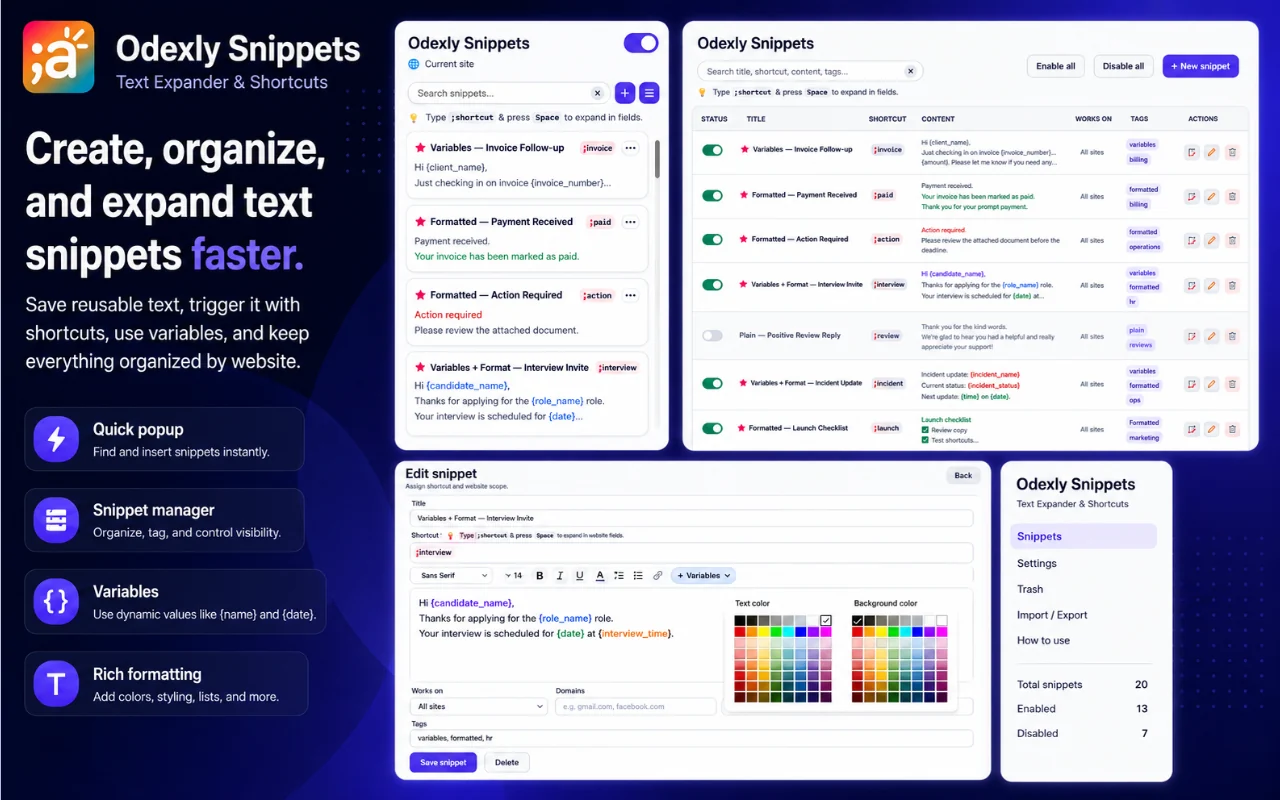
Best for: Customer support, online sellers, sales teams, admins, creators, founders, and anyone who writes repeated messages.
Save customer replies, email templates, greetings, support messages, personal notes, task updates, and common writing blocks in one clean place.
Assign a short trigger to each snippet and expand it into a complete message, response, or formatted template while typing.
Choose whether shortcuts expand with Space, Tab, Enter, Shift, Ctrl, Alt, or without an extra activation key depending on your typing style.
Build templates with placeholders such as {name}, {order_id}, {company}, {date}, or custom values, then fill them before insertion.
Assign snippets to specific websites so support templates, sales replies, or personal notes only appear where they are relevant.
Find snippets quickly, update them when needed, and use JSON import/export to back up or move your library manually.
Browse actual extension screens and key flows before installing from the Chrome Web Store.
Odexly Snippets: screenshot 1 of 5. Create reusable snippets
Answers focus on what is currently stated for this product, without adding unsupported review or download claims.
No. The core workflow is designed to work from the Chrome extension without creating an Odexly account.
Suggested by related category, workflow group, availability, and visual tone.


